
Home › Setup Guides › What is Apple TV?
What is Apple TV?
Apple TV is a premium media streaming device developed by Apple Inc., designed to deliver the best of the Apple ecosystem directly to your television. With support for 4K IPTV, AirPlay, Siri voice control, and a growing library of IPTV apps for Apple TV, it’s one of the most capable streaming devices available — especially for users already in the Apple ecosystem.
In this guide, we cover everything about Apple TV: its generations, key features, the best IPTV app for Apple TV, and how it compares to other streaming devices.
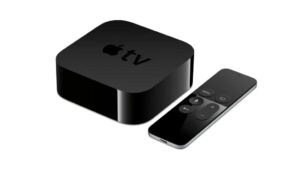
Generations of Apple TV
Apple TV has gone through several generations, each bringing significant improvements:
| Model | Resolution | Key Feature |
|---|---|---|
| Apple TV HD (4th Gen) | 1080p Full HD | tvOS App Store, Siri Remote |
| Apple TV 4K (1st/2nd Gen) | 4K Ultra HD | HDR, Dolby Vision, HDMI 2.0 |
| Apple TV 4K (3rd Gen – 2022+) | 4K Ultra HD | A15 chip, Wi-Fi 6, Thread |
The Apple TV 4K (3rd generation) is the current flagship — and the best model for 4K IPTV streaming, Dolby Vision, and running the latest IPTV apps for Apple TV.
The 4th generation and later models also support Kodi Media Player, expanding their capability as a full IPTV streaming hub.
Key Features of Apple TV for IPTV
4K Ultra HD & Dolby Vision Streaming The Apple TV 4K delivers stunning video quality with 4K IPTV support, HDR10, Dolby Vision, and Dolby Atmos audio — making it one of the best devices for premium IPTV streaming in crystal-clear quality.
AirPlay Integration Stream content directly from your iPhone, iPad, or Mac to your Apple TV using AirPlay. This is particularly useful for IPTV for iPhone users who want to cast their stream to a larger screen without any extra apps. VLC player AirPlay is also supported, making it a versatile option for M3U playlist playback.
tvOS App Store Access 4th generation and later Apple TV models include full access to the tvOS App Store, where you can download the best IPTV app for Apple TV options including iPlayTV, IPTV Smarters Pro, and GSE Smart IPTV.
Siri Voice Control Apple TV’s remote includes Siri voice commands — search for channels, control playback, or switch between apps hands-free. A convenient feature for IPTV users navigating large channel lists.
IP Television App IP Television (with IP Television playlist support) is one of the most popular dedicated IPTV player iOS apps available on Apple TV and iPhone — supporting M3U playlists, EPG, and multi-audio tracks.
Screen Mirroring Use iPhone or iPad screen mirroring to cast any IPTV app for iOS to your Apple TV — even apps not natively available on tvOS.
Best IPTV Apps for Apple TV
Here are the top IPTV apps for Apple TV available on the tvOS App Store:
| App | Xtream Codes | EPG | AirPlay | Free |
|---|---|---|---|---|
| iPlayTV | ✅ | ✅ | ✅ | Paid |
| IPTV Smarters Pro | ✅ | ✅ | ✅ | ✅ |
| GSE Smart IPTV | ✅ | ✅ | ✅ | Freemium |
| IP Television | ✅ | ✅ | ✅ | ✅ |
| TiviMate iOS | ✅ | ✅ | ✅ | Freemium |
| Kodi (via sideload) | ✅ (add-on) | ✅ | ✅ | ✅ |
iPlayTV is widely regarded as the best IPTV player for Apple TV due to its VLC-based engine, full Xtream Codes support, and clean tvOS interface.
IPTV for iPhone & iPad (iOS)
The same IPTV apps for Apple TV are also available for IPTV for iPhone and iPad:
- IPTV Smarters Pro for iPhone — Full Xtream Codes, M3U, and EPG support with AirPlay casting
- TiviMate for iPhone — The iOS version of the popular TiviMate IPTV player
- Best IPTV app for iOS options include GSE Smart IPTV and IP Television for their robust playlist management and EPG support
- IPTV player iOS users can use AirPlay to cast any stream from iPhone directly to Apple TV
Advantages of Apple TV for IPTV
Seamless Apple Ecosystem Integration — Works effortlessly with iPhone, iPad, and Mac via AirPlay, making it the top choice for IPTV for iPhone users who want a whole-home streaming setup.
4K IPTV Quality — Dolby Vision + Dolby Atmos support delivers the best possible picture and sound quality for 4K IPTV streaming.
Regular Firmware Updates — Apple releases frequent tvOS updates with performance improvements, security patches, and new features — keeping your IPTV app for Apple TV running smoothly.
Versatile Entertainment — Beyond IPTV, Apple TV supports gaming, fitness, productivity, and all major streaming services.
Disadvantages of Apple TV
Higher Cost — Apple TV is more expensive than alternatives like FireStick or Roku, making it a premium investment.
Limited Customization — Unlike Android-based IPTV boxes, Apple TV has restricted sideloading options. All apps must come from the tvOS App Store unless using a developer profile.
Apple Ecosystem Dependency — Full functionality (especially AirPlay) is best realized within the Apple ecosystem — less ideal for Android or Windows users.
FAQs
1. What is the best IPTV app for Apple TV?
iPlayTV is consistently rated the best IPTV player for Apple TV for its VLC-based codec support, Xtream Codes integration, AirPlay 2 compatibility, and full EPG. IPTV Smarters Pro and GSE Smart IPTV are strong alternatives depending on your preferences.
2. Can I watch IPTV on Apple TV?
Yes — install any of the IPTV apps for Apple TV from the tvOS App Store (iPlayTV, IPTV Smarters, GSE, IP Television), enter your M3U URL or Xtream Codes credentials, and start streaming.
3. What is the difference between Apple TV HD and Apple TV 4K?
Apple TV HD supports up to 1080p Full HD. Apple TV 4K adds 4K Ultra HD resolution, Dolby Vision, Dolby Atmos, and a faster chip — making it the better choice for 4K IPTV streaming.
4. What are the best IPTV apps for iPhone (iOS)?
The best IPTV app for iOS options include IPTV Smarters Pro for iPhone, TiviMate iOS, GSE Smart IPTV, and IP Television. All support M3U playlists and Xtream Codes. Most also support AirPlay to cast streams to Apple TV.
5. Can I use AirPlay for IPTV streaming?
Yes — any IPTV app for iOS that supports AirPlay can cast your stream from iPhone or iPad to Apple TV. VLC player AirPlay also works for direct M3U playlist streaming from iPhone to TV.
6. Does Apple TV support Kodi?
Yes — Kodi is compatible with 4th generation and later Apple TV models. It can be sideloaded via a developer profile or Xcode. Once installed, Kodi with the PVR IPTV Simple Client provides full IPTV streaming with EPG support.
7. Is TiviMate available for iOS and Apple TV?
TiviMate iOS is available, making it one of the most versatile best IPTV player iOS options for users who also use TiviMate on FireStick or Android. It delivers the same premium interface with full Xtream Codes and EPG support.
8. What is IP Television playlist?
The IP Television playlist feature lets you load an M3U URL directly into the IP Television app on Apple TV or iPhone. It supports live channels, EPG, and multi-audio tracks — making it a solid free IPTV player iOS option.
9. How do I screen mirror iPhone to Apple TV for IPTV?
Swipe down from the top-right corner of your iPhone to open Control Center → tap Screen Mirroring → select your Apple TV. Any IPTV app for iOS on your iPhone will then display on your TV. This works with all IPTV for iPhone apps.
10. Is Apple TV worth it for IPTV streaming?
If you’re already in the Apple ecosystem and want the best 4K IPTV quality with AirPlay, Siri, Dolby Vision, and access to the best IPTV apps for Apple TV, it’s absolutely worth it. For budget-focused users, the FireStick 4K offers similar IPTV capability at a significantly lower price.
Conclusion
Apple TV is a premium, future-proof choice for IPTV streaming — especially for users who want 4K IPTV, Dolby Vision quality, seamless AirPlay from iPhone, and access to the best IPTV app for Apple TV options like iPlayTV, IPTV Smarters Pro, and GSE Smart IPTV. While its price is higher than alternatives, the combination of hardware quality, regular updates, and iOS ecosystem integration makes it one of the best IPTV streaming devices on the market.
Ready to start watching?
Try ArenaIPTV free for 24 hours, or pick the plan that fits your household.
Start Free TrialSee Plans